







Showing posts with label Manipulated By Magik. Show all posts
Showing posts with label Manipulated By Magik. Show all posts
Thursday, September 19, 2013
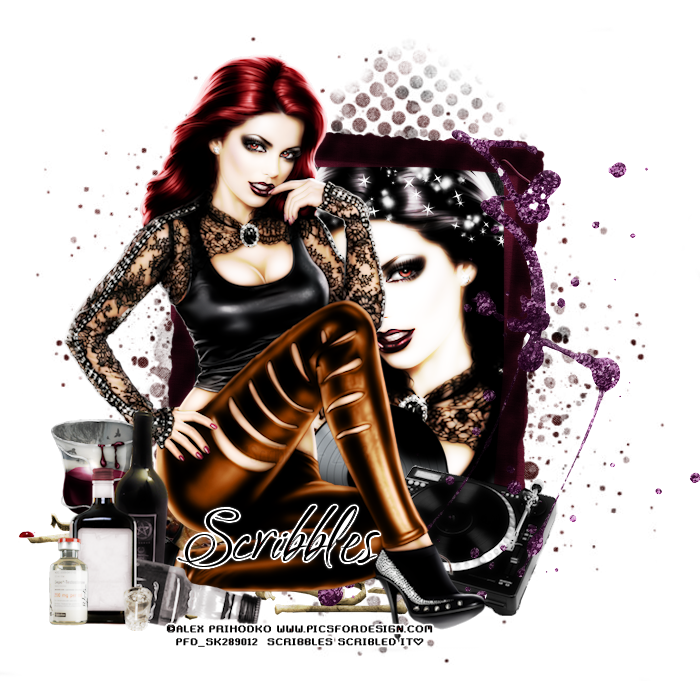
Scrap kit is the Beautiful Pay to use kit Trapped in Autumn Synkkä
It is part of the Trapped in Autumn Series
by Manipulated by Magik You can purchase at Pics for Design
Artwork is by Alex Prihodko, available at Pics for Design
by Manipulated by Magik You can purchase at Pics for Design
Artwork is by Alex Prihodko, available at Pics for Design
Sparklemask 5 by Sue download from the Creative Misfits Blog
New Transparent Rater Layer 700x700
Open frame 4 copy and paste as new layer
resize down by 80%
Open papers 5 and 6
copy and paste both as new layer
Move below the frame layer and paper 6 on top of paper 5
highlight paper 6, and erase all parts on the outside of the frame
Highlight paper 5
Open your mask
Go to Layer, New mask Layer from image
Select the mask from Dropdown and hit ok
Merge group and resize down 1 time by 90%
So it does not take up the entire backgound
Open the tube copy and paste as new layer
resize down 3 times by 90% and move below the frame
Erase all parts on the outside
Add a Xero : Radiance with the following settings
Open the full tube copy and paste as new layer
mirror and move to the left
Resize down about 4 times by 80%
Place as desired
Open the Turntable copy and paste as new layer
resize down 2 times by 80% and move to the right
below the full Tube layer
Open the viynl copy and paste as new layer
resize down 4 times by 80% and move below the turntable and to the left
I have it below her leg
Open the sparkles copy and paste as new layer
Move below the frame layer and to the top
Erase all parts on the outside
open the bones copy and paste as new layer
move to the left below the tube layer
sorta like she is sitting on it
Open the bleeding leaves
copy and paste as new layer
Move blow the tube layer
Kind of sitting on the bones
open the glitter splatter copy and paste as new layer
Move below the tube layer to the right
Grab the eraser and carefully erase the spots on the
Closeup tube layer
open the liquor copy and paste as new layer
Move above all other layers
Resize down 2 times by 80% and again by 90%
Move to the left above her foot
open the liquid drugs copy and paste as new layer
Resize down to desired and move to the left above the liquor
open the drink copy and paste as new layer
Resize down 2 times by 80%
Move below the liquor and to the left
Add name copyright and save
New Transparent Rater Layer 700x700
Open frame 4 copy and paste as new layer
resize down by 80%
Open papers 5 and 6
copy and paste both as new layer
Move below the frame layer and paper 6 on top of paper 5
highlight paper 6, and erase all parts on the outside of the frame
Highlight paper 5
Open your mask
Go to Layer, New mask Layer from image
Select the mask from Dropdown and hit ok
Merge group and resize down 1 time by 90%
So it does not take up the entire backgound
Open the tube copy and paste as new layer
resize down 3 times by 90% and move below the frame
Erase all parts on the outside
Add a Xero : Radiance with the following settings
Open the full tube copy and paste as new layer
mirror and move to the left
Resize down about 4 times by 80%
Place as desired
Open the Turntable copy and paste as new layer
resize down 2 times by 80% and move to the right
below the full Tube layer
Open the viynl copy and paste as new layer
resize down 4 times by 80% and move below the turntable and to the left
I have it below her leg
Open the sparkles copy and paste as new layer
Move below the frame layer and to the top
Erase all parts on the outside
open the bones copy and paste as new layer
move to the left below the tube layer
sorta like she is sitting on it
Open the bleeding leaves
copy and paste as new layer
Move blow the tube layer
Kind of sitting on the bones
open the glitter splatter copy and paste as new layer
Move below the tube layer to the right
Grab the eraser and carefully erase the spots on the
Closeup tube layer
open the liquor copy and paste as new layer
Move above all other layers
Resize down 2 times by 80% and again by 90%
Move to the left above her foot
open the liquid drugs copy and paste as new layer
Resize down to desired and move to the left above the liquor
open the drink copy and paste as new layer
Resize down 2 times by 80%
Move below the liquor and to the left
Add name copyright and save

Sunday, September 8, 2013

Artwork by Alex Prihodko , Purchased at Pics for Design
Beautiful PTU Kit "Autumn Festival" by Manipulated by Magik
Purchased at Mystical Scraps
Mask is by Vix
New Transparent Raster Layer 700x700
Open Frame 1 copy and paste as new layer
resize down 1 time by 80%
place in the center
open leaf ring copy and paste as new layer
Move below the frame layer to the center
Open paper 1 copy and paste as new layer
Move below all other layers
erase all parts on the outside
Open paper 2 copy and paste as new layer
Move below all other layers
go to layer
new mask layer from image
select from drop down hot ok
Merge group
open your tube copy and paste as new layer
resize down by 80% and place in the frame
erase all parts on the outside
open the tube again copy and paste as new layer
Move above all other layer, Mirror and move to the left
Resize down as deisred by 80% about 4 times
open the Sign copy and paste as new layer
resize down by 80% 2 times
Move to the right below the foot of the tube
open the wordart copy and paste as new layer
resize down to desired and move to the bottom right
Above all other layers
duplicate and move below the sign
Erase parts covering the sign
but leave the wordart over the tube
open the border copy and paste as new layer
Move below the full tube layer and sign
I have it to where it looks like she is sitting on it
and the cat is peaking out from behind her legs
Open the sparkle and leaves copy and paste as new layer
Move to the bottom below the frame layer
erase all excess on the outside
open the swirl copy and paste as new layer
Move to the bottom below all other layers
duplicate and move below the tube layer
Erase all excess that is above the elements and on the bottom on the tube
Purchased at Mystical Scraps
Mask is by Vix
New Transparent Raster Layer 700x700
Open Frame 1 copy and paste as new layer
resize down 1 time by 80%
place in the center
open leaf ring copy and paste as new layer
Move below the frame layer to the center
Open paper 1 copy and paste as new layer
Move below all other layers
erase all parts on the outside
Open paper 2 copy and paste as new layer
Move below all other layers
go to layer
new mask layer from image
select from drop down hot ok
Merge group
open your tube copy and paste as new layer
resize down by 80% and place in the frame
erase all parts on the outside
open the tube again copy and paste as new layer
Move above all other layer, Mirror and move to the left
Resize down as deisred by 80% about 4 times
open the Sign copy and paste as new layer
resize down by 80% 2 times
Move to the right below the foot of the tube
open the wordart copy and paste as new layer
resize down to desired and move to the bottom right
Above all other layers
duplicate and move below the sign
Erase parts covering the sign
but leave the wordart over the tube
open the border copy and paste as new layer
Move below the full tube layer and sign
I have it to where it looks like she is sitting on it
and the cat is peaking out from behind her legs
Open the sparkle and leaves copy and paste as new layer
Move to the bottom below the frame layer
erase all excess on the outside
open the swirl copy and paste as new layer
Move to the bottom below all other layers
duplicate and move below the tube layer
Erase all excess that is above the elements and on the bottom on the tube
On both Leave what is over the sign
Open the Bokah Scatter Copy and paste as new layer
Move below all element layers and up near the center
I have it to where its Mixed with the leaves and sparkle
Add name copyright and save
Open the Bokah Scatter Copy and paste as new layer
Move below all element layers and up near the center
I have it to where its Mixed with the leaves and sparkle
Add name copyright and save
Subscribe to:
Posts
(Atom)
STAMPS


