







Friday, August 30, 2024


Wednesday, August 21, 2024


Monday, August 19, 2024

Wednesday, March 27, 2024


Monday, March 25, 2024


Sunday, January 12, 2014
Dream of Me-
Artwork by Lady Mishka New ( available at Pics for Design)
Beautiful Pay to Use Scrap Kit "Dreams" by Chichi Designz
please see her blog for a list of stores this kit is available in


Sunday, November 24, 2013

Artwork of Irmino Pin-oops Purchased at SATC
You can visit his site here
PTU scrapkit Summertime by Purple Dreams Scraps
Mask of Choice, I am using one from the Misfits Creations
New Transparent Raster Layer 700x700
open frame1 copy and paste as new layer
place in the center
open paper9 copy and paste as new layer
Move below the frame and erase all parts on the outside
add a drop shadow to the frame
Open mask of choice. I am using mask06 by from the Misfits Creations
Open paper6 or paper of choice copy and paste as new layer
move below all other layers
Go to layers, new mask layer, from image select mask from dropdwon
Hit ok, Merger group
Open your tube copy and paste as new layer
Move above all other layers
resize down 2 times 1 by 80% and again by 95%
open the sand copy and paste as new layer
resize down 1 time by 95% and again by 90 %
Move below the tube layer
Open palmtree copy and paste as new layer
resize down as desired and move to the left below the sand
open the beach bag copy and paste as new layer
resize down 3 times by 80%
Move to the left
below the tube layer
Open the beachdrinks copy and paste as new layer
resize down 3 times by 80% and move to the
right above all other layers
Open the starfishs copy and paste as new layer
resize down 2 times by 80% and move to the right above all other layers
Add name copyright and save
PTU scrapkit Summertime by Purple Dreams Scraps
Mask of Choice, I am using one from the Misfits Creations
New Transparent Raster Layer 700x700
open frame1 copy and paste as new layer
place in the center
open paper9 copy and paste as new layer
Move below the frame and erase all parts on the outside
add a drop shadow to the frame
Open mask of choice. I am using mask06 by from the Misfits Creations
Open paper6 or paper of choice copy and paste as new layer
move below all other layers
Go to layers, new mask layer, from image select mask from dropdwon
Hit ok, Merger group
Open your tube copy and paste as new layer
Move above all other layers
resize down 2 times 1 by 80% and again by 95%
open the sand copy and paste as new layer
resize down 1 time by 95% and again by 90 %
Move below the tube layer
Open palmtree copy and paste as new layer
resize down as desired and move to the left below the sand
open the beach bag copy and paste as new layer
resize down 3 times by 80%
Move to the left
below the tube layer
Open the beachdrinks copy and paste as new layer
resize down 3 times by 80% and move to the
right above all other layers
Open the starfishs copy and paste as new layer
resize down 2 times by 80% and move to the right above all other layers
Add name copyright and save

Friday, November 15, 2013

Artwork of VeryMany, do not use without a proper license to do so
PTU Scrap kit I Love Candy by Wicked Princess
PTU Scrap kit I Love Candy by Wicked Princess
You can purchase only at The PSP Project
Mask of Choice. I am using one from the Creative Misfits Blog
New transparent raster layer 700x700
Open frame 4 copy and paste as new layer
resize down by 80% 1 time place in the center
open paper 3 copy and paste as new layer
move below the frame and erase all parts on the outside
add a drop shadow to desired
Open your tube copy and paste as new layer
Place as desired in one section of the frame
erase all parts on the outside
repeat with the other 2 sections of the frame
merge all 3 together
add a Xero radiance with desired settings
Open paper of choice i am using paper 9
Copy and paste as new layer
Move below all other layers
Go to layers, New mask layer from image
select from dropdown hit ok. Merge group
open the tube again copy and paste as new layer
resize down as desired
Move above all other layers to the center right
open ribbon 1 copy and paste as new layer
resize down 1 time by 80%
Move to the bottom below the tube layer
open the tablet copy and paste as new layer
resize down 5 times by 80%
Mirror and move to the right below the ribbon
open the puppy copy and paste as new layer
resize down by 80% to desired.
place to the left above all other layers
open the camera copy and paste as new layer
resize down by 80% about 4 times
Move to the left below the dog
open glasses2 copy and paste as new layer
resize down by 80% to desired. move to the right behind the dog
open the polish copy and paste as new layer
resize down 3 times by 80% and move to the left
below the camera
open the lipstick copy and paste as new layer
resize down 4 times by 80%
move to the left above the polish but to the right of the polish
add name copyright and save
Mask of Choice. I am using one from the Creative Misfits Blog
New transparent raster layer 700x700
Open frame 4 copy and paste as new layer
resize down by 80% 1 time place in the center
open paper 3 copy and paste as new layer
move below the frame and erase all parts on the outside
add a drop shadow to desired
Open your tube copy and paste as new layer
Place as desired in one section of the frame
erase all parts on the outside
repeat with the other 2 sections of the frame
merge all 3 together
add a Xero radiance with desired settings
Open paper of choice i am using paper 9
Copy and paste as new layer
Move below all other layers
Go to layers, New mask layer from image
select from dropdown hit ok. Merge group
open the tube again copy and paste as new layer
resize down as desired
Move above all other layers to the center right
open ribbon 1 copy and paste as new layer
resize down 1 time by 80%
Move to the bottom below the tube layer
open the tablet copy and paste as new layer
resize down 5 times by 80%
Mirror and move to the right below the ribbon
open the puppy copy and paste as new layer
resize down by 80% to desired.
place to the left above all other layers
open the camera copy and paste as new layer
resize down by 80% about 4 times
Move to the left below the dog
open glasses2 copy and paste as new layer
resize down by 80% to desired. move to the right behind the dog
open the polish copy and paste as new layer
resize down 3 times by 80% and move to the left
below the camera
open the lipstick copy and paste as new layer
resize down 4 times by 80%
move to the left above the polish but to the right of the polish
add name copyright and save
Wednesday, November 6, 2013

Artwork by Alicia Mujica. Visit her blog for purchasing and license information.
Beautiful PTU scrapkit "XtenZively Cutie" by Hungry Hill
You can purchase this kit at Mystical Scraps
New Transparent Raster Layer 700x700
frame 2 copy and paste as new layer
resize down 2 times by 80%
paper 2 move below frame erase all parts on the outside
OPEN YOUR tube copy and paste as new layer
resize down as desired and place below the frame
Duplicate place as desired move below the origional tube layer and merge down
Open tube again copy and paste as new layer
resize down as desired and place in the center
Duplicate frame layer and move above tube layer
Erase parts covering the top of the tube
open paperflutterby copy and paste as new layer
Resize down 3 times bt 50% and move to the top right above all other layers
open the luggage copy and paste as new layer
resize down 2 times by 50% and move above all other layers
to the bottom left
open eyeshadow copy and paste as new layer
resize down 2 times by 50 % Move to the right above the luggage
open the lipstick copy and paste as new layer
resize down 2 times by 50% Move to the left below the eyeshadows
open the notecard copy and paste as new layer
resize down 2 times by 50% move to the right below the eyeshadow
open mascara copy and paste as new layer
resize down 2 times by 50% and move above all other layers to the right
open nailpolish copy and paste as new layer
resize down 2 times by 50%
Move below the lipstick and to the right
ribbon 2 copy and paste as new layer
resize down 2 times by 50%
move to the top left corner of the notecard
Add name copyright and save
New Transparent Raster Layer 700x700
frame 2 copy and paste as new layer
resize down 2 times by 80%
paper 2 move below frame erase all parts on the outside
OPEN YOUR tube copy and paste as new layer
resize down as desired and place below the frame
Duplicate place as desired move below the origional tube layer and merge down
Open tube again copy and paste as new layer
resize down as desired and place in the center
Duplicate frame layer and move above tube layer
Erase parts covering the top of the tube
open paperflutterby copy and paste as new layer
Resize down 3 times bt 50% and move to the top right above all other layers
open the luggage copy and paste as new layer
resize down 2 times by 50% and move above all other layers
to the bottom left
open eyeshadow copy and paste as new layer
resize down 2 times by 50 % Move to the right above the luggage
open the lipstick copy and paste as new layer
resize down 2 times by 50% Move to the left below the eyeshadows
open the notecard copy and paste as new layer
resize down 2 times by 50% move to the right below the eyeshadow
open mascara copy and paste as new layer
resize down 2 times by 50% and move above all other layers to the right
open nailpolish copy and paste as new layer
resize down 2 times by 50%
Move below the lipstick and to the right
ribbon 2 copy and paste as new layer
resize down 2 times by 50%
move to the top left corner of the notecard
Add name copyright and save
Wednesday, October 23, 2013


Visit her blog for a Complete list of stores she sells in
Mask is a Creative Misfits Sparkle Mask
New Transparent Raster Layer 600x600
Open element44 copy and paste as new layer
resize down 1 time by 95% and place in the center
open paper 3 copy and paste as ew layer
Move below element 40 and erase all parts on the outside
Open your mask and move to the side
Open paper 8 copy and paste as new layer
Move below all other layers
Go to layer, New mask layer from image
select from drop down and hit ok
Merge group
resize down 3 times by 95%
Open your tube copy and paste as new layer
Move below element 44
resize down 2 times by 90% and erase all on the outside
add a luminance legacy
Open the tube layer again copy and paste as new layer
Resize down 2 times by 70% and again by 90%
Move above all other layers and place where you would like it
duplicate the frame layer and move above the tube layer
Erase all parts covering the tube
Open element 58 copy and paste as new layer
Move below the original frame layer and erase
all parts on the outside
Open element 46 copy and paste as new layer
resize down 1 time by 80% and move to the right
above all other layers
Open element56 copy and paste as new layer
resize down 1 time by 80% and move to the right
Place above element 46
Open element 57 copy and paste as new layer
Resize down 2 times by 80%
Move to the center left above all other layers
Open element 52 copy and paste as new layer
resize down 2 times by 80%
Move to the left above the star
Add name copyright and save
Mask is a Creative Misfits Sparkle Mask
New Transparent Raster Layer 600x600
Open element44 copy and paste as new layer
resize down 1 time by 95% and place in the center
open paper 3 copy and paste as ew layer
Move below element 40 and erase all parts on the outside
Open your mask and move to the side
Open paper 8 copy and paste as new layer
Move below all other layers
Go to layer, New mask layer from image
select from drop down and hit ok
Merge group
resize down 3 times by 95%
Open your tube copy and paste as new layer
Move below element 44
resize down 2 times by 90% and erase all on the outside
add a luminance legacy
Open the tube layer again copy and paste as new layer
Resize down 2 times by 70% and again by 90%
Move above all other layers and place where you would like it
duplicate the frame layer and move above the tube layer
Erase all parts covering the tube
Open element 58 copy and paste as new layer
Move below the original frame layer and erase
all parts on the outside
Open element 46 copy and paste as new layer
resize down 1 time by 80% and move to the right
above all other layers
Open element56 copy and paste as new layer
resize down 1 time by 80% and move to the right
Place above element 46
Open element 57 copy and paste as new layer
Resize down 2 times by 80%
Move to the center left above all other layers
Open element 52 copy and paste as new layer
resize down 2 times by 80%
Move to the left above the star
Add name copyright and save
Wednesday, October 9, 2013

Artwork by Alex Prihodko, you can purchase at Pics for Design
Beautiful PTU Scrap kit "Bubblegum Kisses" by Starz Creationz
Beautiful PTU Scrap kit "Bubblegum Kisses" by Starz Creationz
Please visit her blog for a complete list of store she sells in
New Transparent layer 700x700
Open frame 3 copy and paste as new layer
Free rotate to the right by 90%
Open paper 3 copy and paste as new layer
resize down 1 time by 80%
Move below frame 3 and erase all on the outside
Open your tube copy and paste as new layer
Resize down 3 times by 80%
Move below the frame layer and erase all on the outside
Open frame 4, Size up by 110% 3 times
Move below frame 3
Open your tube again copy and paste as new layer
Move above all other layers
Mirror
Resize down 1 time by 60% and again by 90%
Duplicate both frame layers and move above the tube layer
Erase parts of the tube on the outside of the frame
Now erase parts of both frames covering the top of the tube
Open element 10 copy and paste as new layer
duplicate, Merge down, and move to the bottom above all other layers
Open element 50 copy and paste as new layer
Move below element 10 and to the bottom
open element 20 copy and paste as new layer
Move to the left above all other layers
open element 8 copy and paste as new layer
Move above all other layers
resize down 2 times by 90%
Mirror and move to the right
open element 3 copy and paste as new layer
Move below all other layers
open element 53 copy and paste as new layer
resize down 3 times by 90%
Mirror and move to the right below the rabbit
open element 25 copy and paste as new layer
Move below the cat and rabbit placing center bottom
add name copyright and save
Sunday, October 6, 2013

FTU Kit A Hunting We will go By Daphs Scrappin Kreations
Artwork by Elias Chatzoudis. This was purchased Through MPT but you can purchase from His Store
Mask of choice I am using one from The Creative Misfits blog
New Transparent Raster Layer 700x700
frame 1 copy and paste as new layer
Resize down 1 time by 80%
Place in the center
paper 9 copy and paste as new layer
Move below the frame and erase all parts on the outside
open the tube copy and paste as new layer
Move above the frame layer
Duplicate the frame and move above tube layer
Erase parts of the tube at the bottom on the outside of the frame
now erase parts of the frame covering the tube
Open the spooky pumpkin copy and paste as new layer
resize down 2 times by 60% and again by 80%
Move to the left Above all other layers
open stars 1 and 2 copy and paste as new layer
resize down to desired. Star 1 alittle larger than 2.
Move below the spooky pumpkin and to the right
place star 2 on top of star 1 and to the right
open the kitty on skull copy and paste as new layer
resize down 5 times by 80% ad move to the right above all other layers
open candycorn2 Copy and paste as new layer
resize down 3 times by 80%
move to the right below all other layers
add name copyright and save
Artwork by Elias Chatzoudis. This was purchased Through MPT but you can purchase from His Store
Mask of choice I am using one from The Creative Misfits blog
New Transparent Raster Layer 700x700
frame 1 copy and paste as new layer
Resize down 1 time by 80%
Place in the center
paper 9 copy and paste as new layer
Move below the frame and erase all parts on the outside
open the tube copy and paste as new layer
Move above the frame layer
Duplicate the frame and move above tube layer
Erase parts of the tube at the bottom on the outside of the frame
now erase parts of the frame covering the tube
Open the spooky pumpkin copy and paste as new layer
resize down 2 times by 60% and again by 80%
Move to the left Above all other layers
open stars 1 and 2 copy and paste as new layer
resize down to desired. Star 1 alittle larger than 2.
Move below the spooky pumpkin and to the right
place star 2 on top of star 1 and to the right
open the kitty on skull copy and paste as new layer
resize down 5 times by 80% ad move to the right above all other layers
open candycorn2 Copy and paste as new layer
resize down 3 times by 80%
move to the right below all other layers
add name copyright and save
Saturday, October 5, 2013

Artwork by Zlata M , you can purchase from Pics for Design
Beautiful PTU Scrap kit "Remember Me" RissaSDesigns
Please visit her blog for a complete list of stores she sells in
New Transparent Raster Layer 700x700
Open frame 5 copy and paste as new layer
Mirror and move slightly off center right
open paper 6 copy and paste as new layer
Resize down 2 times by 80% and move below frame layer
erase all parts on the outside
open the tube layer copy and paste as new layer
Move below the frame
erase all parts on the outside
add a black and white film
open star scatter copy and paste as new layer
move below all other layers
Open flower 2 copy and paste as new layer
resize down 1 time by 80%
move to the left above all other layers
Open the following elements
Perfume
Purse
Lipstick2
Diary
Winged clock
Copy and paste the Perfume to the Diary as name layer
Resize and place to the left above all other layers as desired
Open Winged Clock copy and paste as new layer
resize down as deisred and move to the top left
above all other layers
add name copyright and save
Monday, September 30, 2013

Beautiful PTU scrapkit is by Irish Princess Designs "Madnes"
You can purchase from Sweet Pinups Store
Artwork of Jose Cano , purchase at SATC
Mask of choice
New Transparent Raster Layer 700x700
open frame 2 copy and paste as new layer
resize down 2 times by 80% placing in the center
open paper 2 copy and paste as new layer
Move below frame and resize down 2 times by 80%
Erase all parts on the outside
open paper 12 copy and paste as new layer
Move below all other layers
Open your mask. I am using sparkle mask 5 from sue
Mask of choice
New Transparent Raster Layer 700x700
open frame 2 copy and paste as new layer
resize down 2 times by 80% placing in the center
open paper 2 copy and paste as new layer
Move below frame and resize down 2 times by 80%
Erase all parts on the outside
open paper 12 copy and paste as new layer
Move below all other layers
Open your mask. I am using sparkle mask 5 from sue
Downloaded from the Creative Misfits Creations Blog
Go to layer, new mask layer from image
select from dropdown, hit ok
merge group and resize down 2 times by 90%
Open the floor copy and paste as new layer
Move below the frame layer
open cards 1 copy and paste as new layer
move below the floor and centered
open close up tube layer copy and paste as new layer
resize down as desired mirror and move to the far right
Place behind frame and erase all on the outside.
Add a luminance legacy
Open full tube layer copy and paste as new layer
resixze down as desired and move to the left above all other layers
open swirl and swirl 1 copy and paste as new layer
Resize down by 80%
Move swirl one to the right below full tube layer so its barely visible
Move swirl2 below the full tube layer to the left above swirl
open the books copy and paste as new layer
resize down as desired by 80% and move to the right above all layers
open the sugar bowl copy and paste as new layer
resize down as desired and place in the center
below the full tube layer
open the teapot copy and paste as new layer
resize down as desired, 1 time more than the sugar bowl
Place above the sugar bowl
Open the cake copy and paste as new layer
resize down 3 times by 80% and move above all other layers
above the right knee of the tube
open the cup copy and paste as new layer
resize down to desired
Move above all other layers and to the right
Add name copyright and save
Go to layer, new mask layer from image
select from dropdown, hit ok
merge group and resize down 2 times by 90%
Open the floor copy and paste as new layer
Move below the frame layer
open cards 1 copy and paste as new layer
move below the floor and centered
open close up tube layer copy and paste as new layer
resize down as desired mirror and move to the far right
Place behind frame and erase all on the outside.
Add a luminance legacy
Open full tube layer copy and paste as new layer
resixze down as desired and move to the left above all other layers
open swirl and swirl 1 copy and paste as new layer
Resize down by 80%
Move swirl one to the right below full tube layer so its barely visible
Move swirl2 below the full tube layer to the left above swirl
open the books copy and paste as new layer
resize down as desired by 80% and move to the right above all layers
open the sugar bowl copy and paste as new layer
resize down as desired and place in the center
below the full tube layer
open the teapot copy and paste as new layer
resize down as desired, 1 time more than the sugar bowl
Place above the sugar bowl
Open the cake copy and paste as new layer
resize down 3 times by 80% and move above all other layers
above the right knee of the tube
open the cup copy and paste as new layer
resize down to desired
Move above all other layers and to the right
Add name copyright and save
Thursday, September 19, 2013
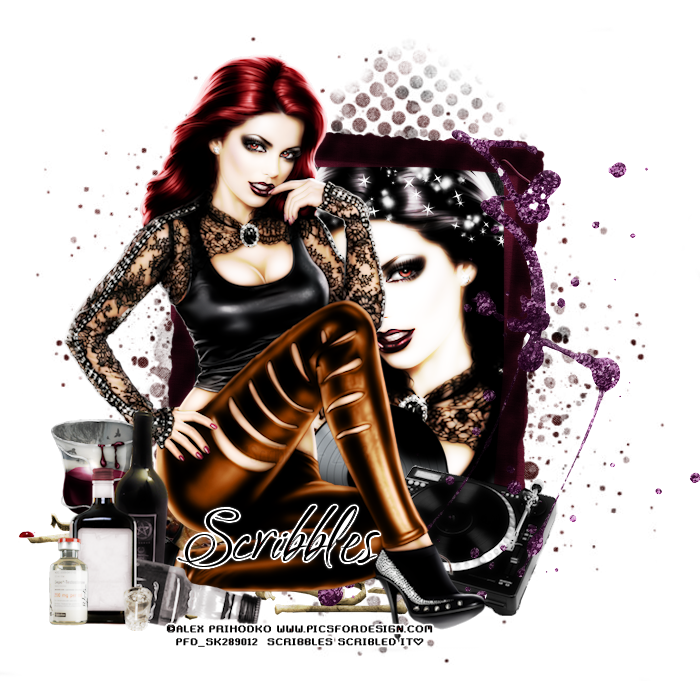
Scrap kit is the Beautiful Pay to use kit Trapped in Autumn Synkkä
It is part of the Trapped in Autumn Series
by Manipulated by Magik You can purchase at Pics for Design
Artwork is by Alex Prihodko, available at Pics for Design
by Manipulated by Magik You can purchase at Pics for Design
Artwork is by Alex Prihodko, available at Pics for Design
Sparklemask 5 by Sue download from the Creative Misfits Blog
New Transparent Rater Layer 700x700
Open frame 4 copy and paste as new layer
resize down by 80%
Open papers 5 and 6
copy and paste both as new layer
Move below the frame layer and paper 6 on top of paper 5
highlight paper 6, and erase all parts on the outside of the frame
Highlight paper 5
Open your mask
Go to Layer, New mask Layer from image
Select the mask from Dropdown and hit ok
Merge group and resize down 1 time by 90%
So it does not take up the entire backgound
Open the tube copy and paste as new layer
resize down 3 times by 90% and move below the frame
Erase all parts on the outside
Add a Xero : Radiance with the following settings
Open the full tube copy and paste as new layer
mirror and move to the left
Resize down about 4 times by 80%
Place as desired
Open the Turntable copy and paste as new layer
resize down 2 times by 80% and move to the right
below the full Tube layer
Open the viynl copy and paste as new layer
resize down 4 times by 80% and move below the turntable and to the left
I have it below her leg
Open the sparkles copy and paste as new layer
Move below the frame layer and to the top
Erase all parts on the outside
open the bones copy and paste as new layer
move to the left below the tube layer
sorta like she is sitting on it
Open the bleeding leaves
copy and paste as new layer
Move blow the tube layer
Kind of sitting on the bones
open the glitter splatter copy and paste as new layer
Move below the tube layer to the right
Grab the eraser and carefully erase the spots on the
Closeup tube layer
open the liquor copy and paste as new layer
Move above all other layers
Resize down 2 times by 80% and again by 90%
Move to the left above her foot
open the liquid drugs copy and paste as new layer
Resize down to desired and move to the left above the liquor
open the drink copy and paste as new layer
Resize down 2 times by 80%
Move below the liquor and to the left
Add name copyright and save
New Transparent Rater Layer 700x700
Open frame 4 copy and paste as new layer
resize down by 80%
Open papers 5 and 6
copy and paste both as new layer
Move below the frame layer and paper 6 on top of paper 5
highlight paper 6, and erase all parts on the outside of the frame
Highlight paper 5
Open your mask
Go to Layer, New mask Layer from image
Select the mask from Dropdown and hit ok
Merge group and resize down 1 time by 90%
So it does not take up the entire backgound
Open the tube copy and paste as new layer
resize down 3 times by 90% and move below the frame
Erase all parts on the outside
Add a Xero : Radiance with the following settings
Open the full tube copy and paste as new layer
mirror and move to the left
Resize down about 4 times by 80%
Place as desired
Open the Turntable copy and paste as new layer
resize down 2 times by 80% and move to the right
below the full Tube layer
Open the viynl copy and paste as new layer
resize down 4 times by 80% and move below the turntable and to the left
I have it below her leg
Open the sparkles copy and paste as new layer
Move below the frame layer and to the top
Erase all parts on the outside
open the bones copy and paste as new layer
move to the left below the tube layer
sorta like she is sitting on it
Open the bleeding leaves
copy and paste as new layer
Move blow the tube layer
Kind of sitting on the bones
open the glitter splatter copy and paste as new layer
Move below the tube layer to the right
Grab the eraser and carefully erase the spots on the
Closeup tube layer
open the liquor copy and paste as new layer
Move above all other layers
Resize down 2 times by 80% and again by 90%
Move to the left above her foot
open the liquid drugs copy and paste as new layer
Resize down to desired and move to the left above the liquor
open the drink copy and paste as new layer
Resize down 2 times by 80%
Move below the liquor and to the left
Add name copyright and save
Subscribe to:
Posts
(Atom)
STAMPS


